Java Performance Tuning
The Most Common Mistake
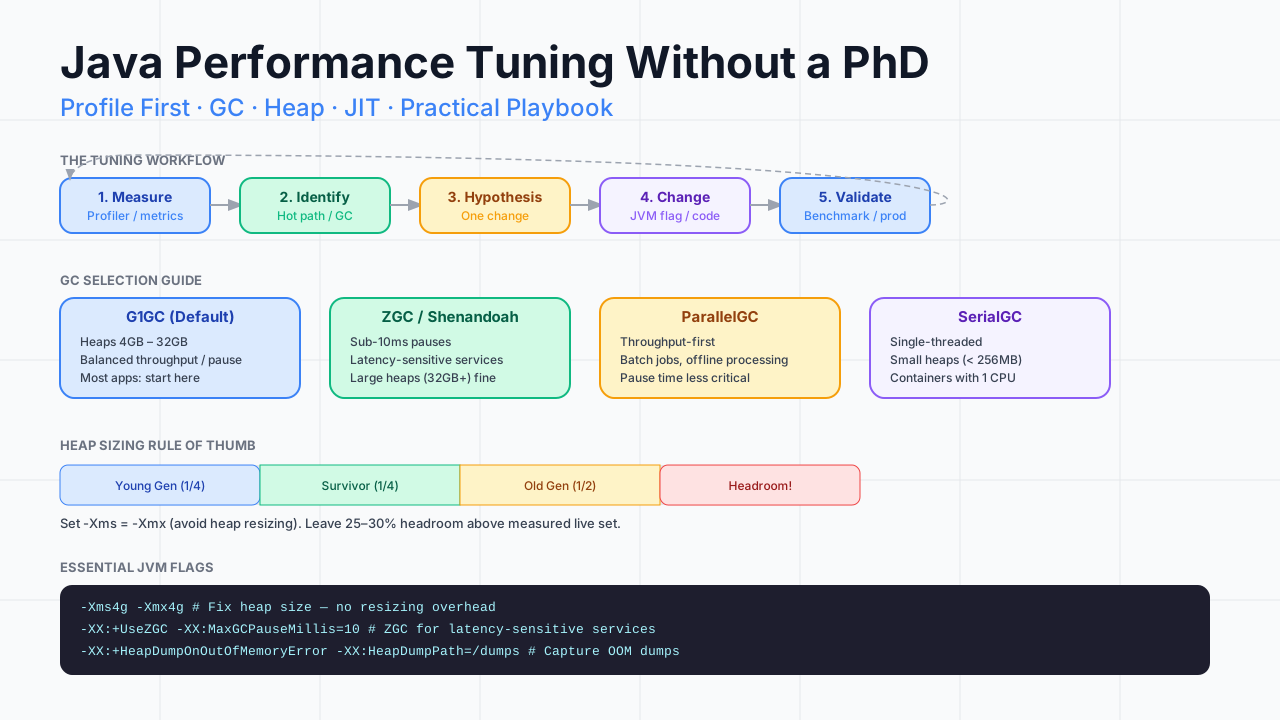
The most common Java performance mistake is changing JVM flags without profiling first. Teams read a blog post, add -XX:+UseZGC -Xmx16g -XX:ParallelGCThreads=8 to their startup script, and call it tuning. Sometimes it helps. Sometimes it makes things worse. It is always a guess.
The correct approach is: measure, identify the bottleneck, form a hypothesis, change one thing, measure again. This post gives you the tools to do that methodically. No PhD required.
Step 1: Understand What You Are Measuring
Before you tune anything, you need to know which performance axis you are optimising.
Latency and throughput are frequently in tension. A GC that maximises throughput (processes more objects per second) may pause your application for longer, increasing tail latency. ZGC has excellent latency characteristics but lower raw throughput than ParallelGC. Knowing which matters more to your application determines which GC you should choose.
Step 2: Profile Before You Tune
Never tune a JVM flag without first understanding where time is actually being spent. The profiler is your first tool, not the last.
Async-profiler (the right tool for production profiling)
Async-profiler is a low-overhead sampling profiler that captures CPU and allocation profiles without the safepoint bias of traditional JVMTI profilers.
# CPU profile — capture 30 seconds
./profiler.sh -d 30 -f cpu_profile.html <pid>

# Allocation profile — find what is allocating most
./profiler.sh -d 30 -e alloc -f alloc_profile.html <pid>

# Wall-clock profile — includes I/O wait time
./profiler.sh -d 30 -e wall -f wall_profile.html <pid>
Open the flame graph. The widest bars at the top are your hot paths. Start there. Do not start with JVM flags.
Enable GC logging
Always enable GC logging in production. It is extremely low overhead and provides essential data for understanding memory behaviour.
-Xlog:gc*:file=/var/log/app/gc.log:time,uptime,level,tags:filecount=10,filesize=20mRead GC logs with GCEasy (web tool) or GCViewer. Look for:
- Pause time distribution (how often are pauses over 100ms?)
- GC frequency (how often is GC running?)
- Heap utilisation before/after GC (how much is live data vs garbage?)
Step 3: Choose the Right GC
GC selection is the highest-leverage tuning decision. The right choice depends on your heap size and latency requirements.
G1GC tuning (when you use the default)
# G1GC — most applications start here
-XX:+UseG1GC
-XX:MaxGCPauseMillis=200        # Target pause time — G1 will try to meet this
-XX:G1HeapRegionSize=16m        # Increase for large heaps (> 16GB)
-XX:InitiatingHeapOccupancyPercent=35  # Start concurrent marking earlier
-XX:G1ReservePercent=20         # Emergency reserve to prevent promotion failure
The MaxGCPauseMillis is a target, not a hard limit. G1 will trade throughput for pause time to try to meet it. Set it to a value you can tolerate, not to 1ms (which tells G1 to GC so frequently it destroys throughput).
ZGC tuning (for latency-critical services)
# ZGC — sub-10ms pauses
-XX:+UseZGC
-XX:SoftMaxHeapSize=6g          # Target heap; ZGC uses up to -Xmx when needed
-XX:ZCollectionInterval=1       # Force GC at most every 1 second (helps with very idle apps)
-XX:+ZGenerational              # Generational ZGC (Java 21+ default, significant improvement)
ZGC in Java 21 with -XX:+ZGenerational is significantly better than the non-generational version. If you are on Java 21+, this flag is on by default. If you are on Java 17 to 20, add it explicitly.
Step 4: Size the Heap Correctly
Heap sizing is more science than art if you use GC logs.
The formula
Recommended heap size = (Live set size × 3) + 30% headroom

Where:
  Live set size = heap after full GC in GC logs
If your GC logs show the heap settles at 2GB after a full GC, your live set is approximately 2GB. Your heap should be at least 6GB, ideally 8GB.
Fixing heap size
# WRONG — allows heap to resize, costs CPU
-Xms512m -Xmx4g

# RIGHT — fixed heap, no resizing cost
-Xms4g -Xmx4g
Setting -Xms equal to -Xmx prevents the JVM from spending time growing and shrinking the heap. For server applications, this is almost always the right choice.
Metaspace
Metaspace stores class metadata. It defaults to unbounded. Set a maximum to prevent runaway class loading from consuming all memory.
-XX:MetaspaceSize=256m        # Initial size
-XX:MaxMetaspaceSize=512m     # Maximum — alert if this is nearly full
Step 5: Find and Fix Allocation Hot Spots
GC problems are almost always allocation problems. Less allocation = less GC = better performance. The async-profiler allocation profile shows you exactly what is allocating.
Common patterns to look for:
String concatenation in loops
// Bad — allocates a new String on every iteration
String result = "";
for (String item : items) {
    result += item + ", ";  // Creates new String each time
}

// Good — single allocation
StringBuilder sb = new StringBuilder();
for (String item : items) {
    sb.append(item).append(", ");
}
String result = sb.toString();
Autoboxing in hot paths
// Bad — unboxes and reboxes Long on every iteration
Map<Long, Long> counters = new HashMap<>();
for (Event event : events) {
    Long current = counters.get(event.id());        // unbox
    counters.put(event.id(), current == null ? 1L : current + 1L); // box
}

// Good — use a primitive map (Eclipse Collections, Trove, or Agrona)
LongLongHashMap counters = new LongLongHashMap();
for (Event event : events) {
    counters.addToValue(event.id(), 1L);
}
Unnecessary collection copies
// Bad — copies the list to filter it
List<Order> filtered = new ArrayList<>(orders);
filtered.removeIf(o -> !o.isActive());

// Good — stream without intermediate copy
List<Order> filtered = orders.stream()
    .filter(Order::isActive)
    .toList();  // Java 16+ — unmodifiable list, no copy
Step 6: JIT Compilation
The JIT compiler is largely automatic but you can help it.
Keep methods small
The JIT inlines methods up to a bytecode size threshold (35 bytecodes by default for "trivial" inlining, up to 325 for "non-trivial"). Methods that exceed the threshold are not inlined, creating dispatch overhead on hot paths.
// This will be inlined — small, simple
public double calculateTax(double price) {
    return price * 0.2;
}

// Consider extracting large methods into smaller pieces
// to improve JIT inlining on hot paths
Monitor JIT compilation
-XX:+PrintCompilation           # Log every method compiled
-XX:+UnlockDiagnosticVMOptions
-XX:+PrintInlining              # Log inlining decisions
Use JITWatch (open source) to visualise JIT compilation activity and identify methods that are being deoptimised (compiled, then rolled back to interpreted mode — a red flag for performance).
The Production JVM Flags Template
Here is the template I use for production Spring Boot services:
# Heap — fixed size, sized to 3× live set
-Xms8g
-Xmx8g

# GC — ZGC for latency-sensitive, G1 for everything else
-XX:+UseZGC
-XX:+ZGenerational
-XX:SoftMaxHeapSize=6g

# GC logging — always on
-Xlog:gc*:file=/var/log/app/gc.log:time,uptime:filecount=10,filesize=20m

# OOM handling — capture heap dump automatically
-XX:+HeapDumpOnOutOfMemoryError
-XX:HeapDumpPath=/var/dumps/

# Metaspace — bounded
-XX:MaxMetaspaceSize=512m

# JVM housekeeping
-XX:+DisableExplicitGC           # Ignore System.gc() calls
-XX:+AlwaysPreTouch              # Touch all heap pages at startup (consistent latency)
-XX:+UseStringDeduplication      # G1 only — deduplicate String instances in old gen
Reading the Metrics
When you have these flags in place, here is what to monitor:
Prometheus + JVM Micrometer exposes all of these metrics automatically with Spring Boot. The Grafana JVM dashboard gives you the full picture in one place.
Performance Tuning Is Iterative
The process does not end. Production workloads change. Traffic patterns shift. New code introduces new hot paths. Tune once and forget is not a strategy.
The engineers who maintain consistently fast JVM applications are the ones who treat profiling as a routine activity — not an emergency response. Schedule a quarterly profiling session. Review GC logs weekly. Track your p99 latency trend. Catch regressions before your users do.
The tools are good. The methodology is straightforward. The only thing required is the discipline to measure before you change.