Designing for Observability from Day One
The 3am Problem
Every on-call rotation I have been part of has had the same experience at least once. It is 3am. An alert fires. You open the dashboards and find... a CPU spike in one service, no corresponding error rate, and a set of logs that say nothing useful. You spend two hours grepping through log files from six services trying to reconstruct what a single user request did. Eventually you find it — a misconfigured timeout that was causing retries that were causing downstream congestion.
The fix takes five minutes. The investigation takes two hours.
That two-hour investigation is not inevitable. It happens when observability is treated as something you add after the system is built. Systems that are debuggable in production are designed to be debuggable. That design happens alongside the feature work, not after the incident.
This post is the observability design guide I wish I had had ten years ago.
The Three Pillars, and Why You Need All Three
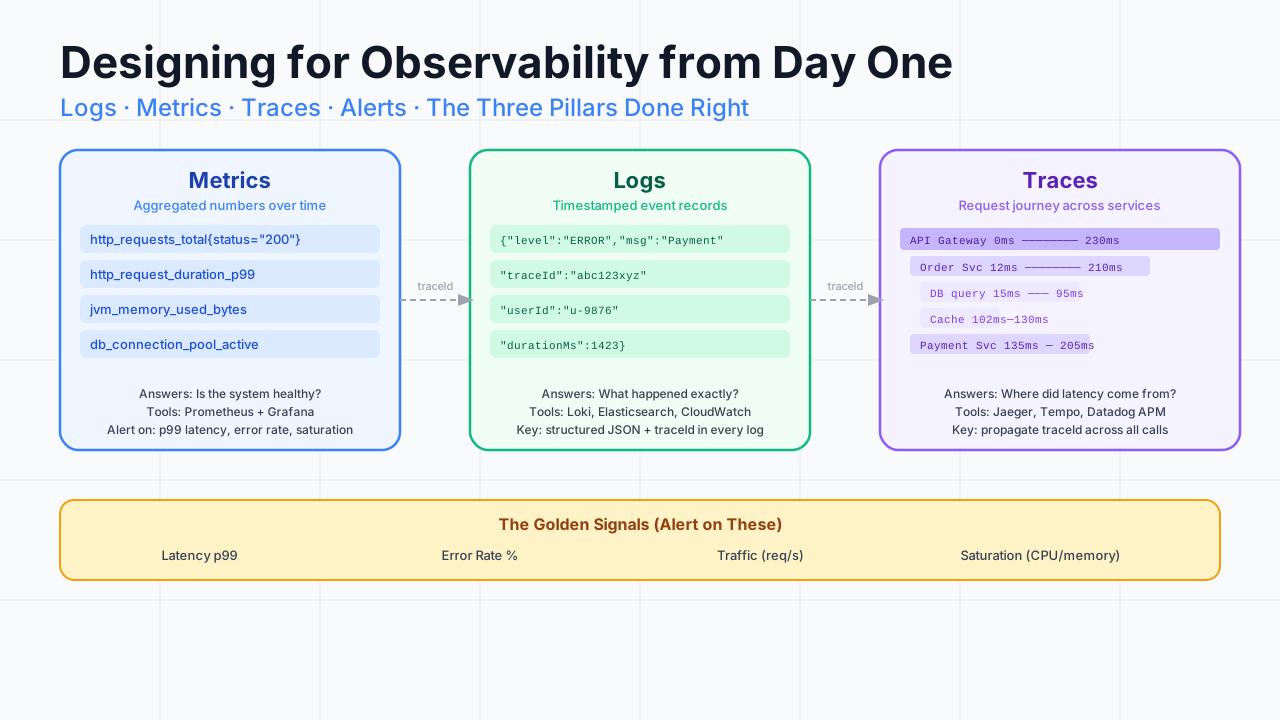
Each pillar answers a different question:
The critical insight: the three pillars are not redundant. They are complementary. An alert on error rate tells you something is wrong. It does not tell you which request triggered it or which downstream service caused it. Logs give you the event detail. Traces connect the event across service boundaries. You need all three.
Pillar 1: Metrics That Matter
The Four Golden Signals
Google SRE popularised four signals that are sufficient to alert on almost any production problem:
Every service you build should expose all four. Everything else is supplementary.
Instrument once, use everywhere
OpenTelemetry is now the standard. Instrument your services once with the OTel SDK and emit to whichever backend you use (Prometheus, Datadog, Honeycomb) by swapping the exporter.
// Spring Boot with Micrometer — auto-instruments HTTP, DB, JVM
// application.yml
management:
  metrics:
    export:
      prometheus:
        enabled: true
  endpoints:
    web:
      exposure:
        include: prometheus, health, info

# Custom business metrics
@Service
public class OrderService {

    private final Counter ordersCreated;
    private final Timer orderProcessingTime;

    public OrderService(MeterRegistry registry) {
        this.ordersCreated = Counter.builder("orders.created")
            .description("Total orders created")
            .tag("channel", "web")
            .register(registry);

        this.orderProcessingTime = Timer.builder("orders.processing.time")
            .description("Time to process an order end-to-end")
            .percentiles(0.5, 0.95, 0.99)  // Expose p50, p95, p99
            .register(registry);
    }

    public Order createOrder(OrderRequest request) {
        return orderProcessingTime.record(() -> {
            Order order = processOrder(request);
            ordersCreated.increment();
            return order;
        });
    }
}
What to name your metrics
Metric naming is not cosmetic. It determines how easy your dashboards are to build and how readable your alert rules are.
# Convention: {domain}_{entity}_{action}_{unit}

# Good
http_server_requests_total{status="200", path="/api/orders"}
http_server_request_duration_seconds_bucket{le="0.1"}
orders_created_total{channel="web", region="eu-west"}
db_connection_pool_active_connections{pool="main"}

# Bad
myService_thing1_count
req_dur
custom_metric_xyz
Follow Prometheus naming conventions. Use snake_case. Include the unit in the name (_seconds, _bytes, _total). Use labels for dimensions, not metric names.
Pillar 2: Structured Logs
The unstructured log problem
// Bad — unstructured, unsearchable
log.error("Failed to process order " + orderId + " for user " + userId +
          " after " + duration + "ms: " + exception.getMessage());

// Log line in Elasticsearch:
// "Failed to process order ord-123 for user usr-456 after 1423ms: Timeout"
// → You cannot filter by orderId without string parsing
// Good — structured, every field is searchable
log.error("Order processing failed",
kv("orderId", orderId),
kv("userId", userId),
kv("durationMs", duration),
kv("errorType", "TIMEOUT"),
kv("traceId", MDC.get("traceId"))
);
// Log line in Elasticsearch:
// { "message": "Order processing failed", "orderId": "ord-123",
// "userId": "usr-456", "durationMs": 1423, "traceId": "abc123" }
// → You can filter by orderId, traceId, errorType, etc.Every log field should be machine-searchable. In an incident at 3am, you are not reading logs linearly. You are searching: "show me all errors for traceId abc123." You can only do that if traceId is a structured field.
MDC and trace context propagation
The traceId must be in every log line from the start to the end of a request. MDC (Mapped Diagnostic Context) is the standard mechanism in Java.
// Filter to set traceId on every incoming request
@Component
public class TraceContextFilter extends OncePerRequestFilter {

    @Override
    protected void doFilterInternal(HttpServletRequest request,
                                    HttpServletResponse response,
                                    FilterChain chain) throws IOException, ServletException {
        // Get traceId from upstream (propagated via W3C traceparent header)
        String traceId = extractTraceId(request);
        if (traceId == null) {
            traceId = UUID.randomUUID().toString().replace("-", "");
        }

        MDC.put("traceId", traceId);
        MDC.put("userId", extractUserId(request));
        response.setHeader("X-Trace-Id", traceId);  // Return to client

        try {
            chain.doFilter(request, response);
        } finally {
            MDC.clear();
        }
    }
}
With this filter, every log.info, log.warn, and log.error in the request's call stack automatically includes the traceId and userId without any additional code.
Log levels as a contract
The test for ERROR: would I want to wake someone up for this? If yes, log at ERROR. If no, WARN. Many teams overuse ERROR and then wonder why their alert noise ratio is so high.
Pillar 3: Distributed Traces
A distributed trace shows you the complete journey of a single request across all the services it touched, with timing data for every hop.
Without traces, when you see a 187ms response time, you do not know if the slowness was in the database, the payment service, or somewhere else. With traces, you can see exactly: 40ms in DB, 132ms in Payment Service. You fix the payment service.
OpenTelemetry auto-instrumentation
<!-- Add the OpenTelemetry Java agent to your build -->
<dependency>
    <groupId>io.opentelemetry.instrumentation</groupId>
    <artifactId>opentelemetry-spring-boot-starter</artifactId>
    <version>2.10.0</version>
</dependency>
# application.yml — configure export
otel:
service:
name: order-service
exporter:
otlp:
endpoint: http://tempo:4318 # or Jaeger, Honeycomb, Datadog
traces:
sampler:
probability: 0.1 # 10% sampling in productionAuto-instrumentation captures HTTP requests, database queries, and message publishing without any code changes. Add custom spans for the business operations that matter:
// Custom span for a business-critical operation
@Autowired
private Tracer tracer;

public PaymentResult processPayment(PaymentRequest request) {
    Span span = tracer.spanBuilder("process-payment")
        .setAttribute("payment.amount", request.getAmount())
        .setAttribute("payment.currency", request.getCurrency())
        .setAttribute("payment.provider", request.getProvider())
        .startSpan();

    try (Scope scope = span.makeCurrent()) {
        PaymentResult result = paymentGateway.charge(request);
        span.setAttribute("payment.status", result.getStatus());
        return result;
    } catch (Exception e) {
        span.recordException(e);
        span.setStatus(StatusCode.ERROR, e.getMessage());
        throw e;
    } finally {
        span.end();
    }
}
Alert Design
Alerts are the output of observability. A well-designed alert:
- Has a clear human-readable title
- Links to the relevant dashboard
- States what action to take first
- Fires with high signal, low noise
# Prometheus alert rules
groups:
  - name: order-service
    rules:
      - alert: HighErrorRate
        expr: |
          (
            rate(http_server_requests_total{status=~"5..", service="order-service"}[5m])
            /
            rate(http_server_requests_total{service="order-service"}[5m])
          ) > 0.01
        for: 5m
        labels:
          severity: critical
          team: platform
        annotations:
          summary: "High error rate on order-service ({{ $value | humanizePercentage }})"
          description: "Error rate above 1% for 5 minutes. Check traces for error details."
          runbook_url: "https://wiki.internal/runbooks/order-service-high-error-rate"
          dashboard_url: "https://grafana.internal/d/order-service"

      - alert: HighP99Latency
        expr: |
          histogram_quantile(0.99,
            rate(http_server_request_duration_seconds_bucket{
              service="order-service", path="/api/orders"
            }[5m])
          ) > 2.0
        for: 10m
        labels:
          severity: warning
        annotations:
          summary: "P99 latency above 2s on POST /api/orders"
          description: "99th percentile latency is {{ $value }}s. Check payment service traces."
The for: 5m clause prevents alerts from firing on transient spikes. A two-second latency spike that lasts 30 seconds is a blip. Sustained high p99 for five minutes is an incident.
The Observability Design Checklist
Add this to your definition of done for every new service or feature:
Observability Checklist
═══════════════════════════════════════════════
Metrics
  ☐ Four golden signals instrumented
  ☐ Business-level counters/gauges for key operations
  ☐ Custom metrics follow naming convention
  ☐ Alert rules written for p99 latency and error rate

Logging
  ☐ Structured JSON logging configured
  ☐ Log level policy documented and followed
  ☐ traceId and userId in MDC for all requests
  ☐ No sensitive data (PII, credentials) in logs
  ☐ Meaningful log messages at INFO for business events

Tracing
  ☐ OpenTelemetry auto-instrumentation active
  ☐ Custom spans for business-critical operations
  ☐ traceId propagated in all downstream HTTP calls
  ☐ traceId propagated in all message headers

Dashboards
  ☐ Service dashboard exists with four golden signals
  ☐ Dashboard linked from service README
  ☐ Alert runbook exists with first-response steps

Runbook
  ☐ Top 3 alert scenarios documented
  ☐ Steps to diagnose each scenario
  ☐ Escalation path documented
═══════════════════════════════════════════════
Observability Is a Design Decision, Not an Afterthought
The gap between a system that is debuggable in 5 minutes and one that takes 2 hours to diagnose is not a tooling gap. The tools are good and most teams already have them. The gap is design intent.
When you write a new endpoint, ask: if this fails in production, what will I need to know to diagnose it? Instrument for that now. When you add a database call, add a span. When you add a background job, emit a counter.
The on-call engineer at 3am is you in the future, with less sleep and less patience. Design for that person. They will thank you.